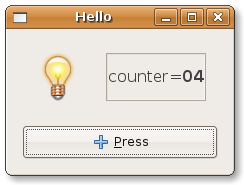
Adapters adapt some part of the model to some part of the view. In a simple version, one adapter makes one property (possibly observable) into the model communicate autonomously with a single widget into the view, and viceversa. Readers can find all information about adapters in the user manual.
We want to have an adapter to handle coordination between property
counter and the label. Model and View remain
unchanged. It is the Controller that can be simplified as follows:
# This is file ctrl_glade_adap.py
from gtkmvc import Controller
import gtk

class MyControllerAdap (Controller):
    def register_view(self, view):
        Controller.register_view(self, view)
        # connects the signals:
        self.view['main_window'].connect('destroy', gtk.main_quit)
        return

    def register_adapters(self):
        self.adapt("counter", "label")
        return

    # signals:
    def on_button_clicked(self, button):
        self.model.counter += 1  # changes the model
        return
    pass # end of class
Controller method register_adapters is called by the framework when adapters can be instantiated. The controller is no longer interested in observing property Counter and to initialize the value shown in the label, as these activities are now transparently carried out by the adapter.
Notice that if editable widget like a text entry were used instead of a label, the adapter would also have taken care about changes of the text entry reporting them to the property.
Now suppose you want to apply some customization to the way the
label shows the property's value. Method
register_adapters might be:
    from gtkmvc import adapters
    def register_adapters(self):
        a = adapters.Adapter(self.model, "counter")
        a.connect_widget(self.view['label'],
             setter=lambda w,v:
               w.set_markup("<big>Counter=<b>%02d</b></big>" % v))
        self.adapt(a)
        return
Here an adapter is created explicitly, and parameter setter is used to custom the functional block that is in charge of writing to the widget.
There are several types of adapters that can be used, depending on the property kind and the widget type they adapt. Adapter offer a very straight and simple default support, but they can be largely customized when needs get more advanced. See the user manual for further information.