From the other hand, the set of widgets can be a list provided by the user, or a container widget like a Box, a Notebook, etc. Widgets will be linked by their position when the property is list-like, or by their names or instances when the property is map-like.
This class supports only properties that are static containers, i.e. those containers that do not change their length dynamically. If the container grows up in length, no change will occur in the view-side.
This class derives from class UserClassAdapter.
def connect_widget(self, widget,
                   getters=None, setters=None,
                   signals=None, arg=None)
When maps are used, keys can be widgets or widget names. The length of the possible lists or maps must be lesser or equal to the number of widgets that will be connected.
Since things got a bit convoluted here, some examples can help to understand how this kind of adapter can be used.
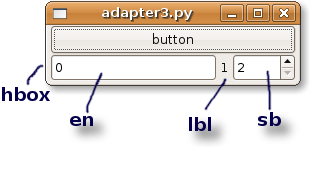
Suppose you have a glade file containing a button and a HBox called "hbox" containing a text entry, a label and a SpinButton.
The view is simply:
class MyView (View):
    def __init__(self, ctrl):
        View.__init__(self, ctrl, "adapters.glade", "window")
        return
    pass # end of class
The model contains a tuple of three integers that we want to connect to the widgets into the HBox. When the button is clicked, one of the three integers is randomly incremented.
class MyModel (Model):
    __properties__ = {
       'box' : [0,1,2]
       }
    pass # end of class
The controller handles the button click signal:
import random
class MyCtrl (Controller):
    def on_button_clicked(self, button):
        self.model.box[random.randint(0,2)] += 1
        return
    pass # end of class
If typically construction of adapters occurs into method register_adapters for the sake of simplicity in this example instantiation of the adapter is located in the main launching code:
m = MyModel()
c = MyCtrl(m)
v = MyView(c)

a = StaticContainerAdapter(m, "box")
a.connect_widget(v["hbox"])

gtk.main()
Adaption of widgets occur by their position into the "hbox" container.
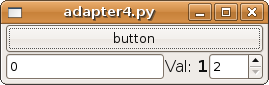
Second example makes use of an explicit list of widgets, and exploits also parameter setters to customize the way the label "lbl" shows its value.
m = MyModel()
c = MyCtrl(m)
v = MyView(c)

a1 = StaticContainerAdapter(m, "box")
a1.connect_widget(map(lambda x: v[x], "en lbl sb".split()),
                  setters = {'lbl': lambda w, v:
                     w.set_markup("<big>Val: <b>%d</b></big>" % v)})

gtk.main()
Finally, instead of being a tuple, the observable property can be also a map, whose keys are widget names.
class MyModel (Model):
    __properties__ = {
        'box' : { 'en'  : 0,
                  'lbl' : 1,
                  'sb'  : 2 }
        }
    pass # end of class
in this case bounding between widgets and values into the property in the model is carried out by looking at names, and not position.